BOM scrubbing is the process of taking a raw customer BOM and cleaning it so every line has a valid manufacturer part number, correct quantity, and complete attributes. It means checking formats, filling gaps, running basic risk checks, and saving a quote-ready version that sourcing and purchasing can use to price builds, send RFQs, and create POs.
Most EMS quoting teams don’t set out looking for “BOM scrubbing.” They feel the impact when a customer sends what internal teams call an “absolute trash” BOM. One file arrives as a PDF that takes more than an hour to convert and clean in Excel. Another has manufacturer and part numbers combined in a single cell with commas and symbols.
Teams end up relying on a few “Excel wizards” to fix formats, extract MPNs from description columns, and stitch together multi-board projects that can take days to prepare.
BOM scrubbing makes the data reliable by ensuring every line is complete, accurate, and aligned with supplier expectations and internal workflows. Let’s walk you through what BOM scrubbing is, what it should include, and how to clean one manually or with software.
Key Takeaways
- BOM scrubbing is about making a BOM clean, complete, and reliable enough to move from quote to PO without constant fixes.
- The biggest headaches come from messy formats, heavy Excel dependence, data gaps, and late-discovered issues like obsolete or “unknown” parts.
- A solid scrub covers part mapping, attributes, risk checks, alternates, and quote-ready formatting so every line can be sourced and built with confidence.
- BOM scrubbing manually is possible but slow, especially with PDFs, multi-board projects, and repeated re-quotes.
- CalcuQuote helps EMS teams bring import, scrubbing, BOM Health, quoting, sourcing, and purchasing into one connected flow.
What is BOM Scrubbing?
BOM scrubbing is the process of preparing a bill of materials so it’s clean, complete, and ready to use across quoting, sourcing, and purchasing. It goes beyond just formatting. The goal is to make sure every part number is accurate, attributes are filled in, and nothing important is missing.
In reality that often means fixing quantities that contain letters instead of numbers, pulling proper part numbers out of distributor codes, and dealing with cells you cannot unmerge after a PDF export.
Why BOM Scrubbing Matters
A BOM that looks fine on the surface can still cause slowdowns once it enters the quoting process. Underneath, a lot of small issues stack up into delays and rework, for example:
- Inconsistent or mistyped part numbers that block automated lookups
- Missing attributes such as package, value, tolerance, or temperature rating
- Unclear alternates or informal notes that nobody can actually source against
- Mismatches between quantity per assembly and reference designators
- Lines with no clear manufacturer listed at all
- Customer or internal part numbers that map to parts that have been obsolete for years
- High risk components that look normal in the BOM but are single sourced, long lead time, or NCNR
- Parts with “unknown” lifecycle status, where long projects depend on components with unclear futures
BOM scrubbing matters because it catches issues like these before quoting, sourcing, and production teams commit time and budget to a BOM that is not really buildable.
Common BOM Scrubbing Problems EMS Teams Talk About
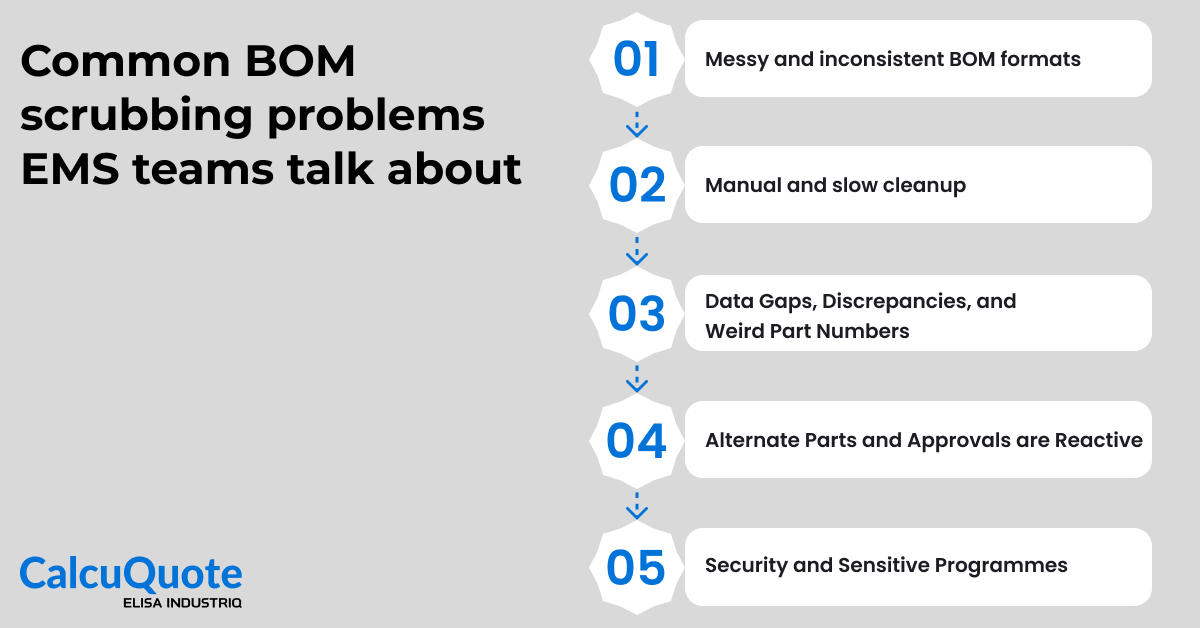
Across demos, workshops, and customer calls, EMS teams use surprisingly similar language to describe their BOMs. The details change by customer and site, yet the patterns repeat.
Messy and Inconsistent BOM Formats
Many teams start with what they openly call “absolute trash” BOMs. Inputs arrive as Excel, PDFs, or drawings with no fixed template. Manufacturer and part numbers might sit on the same line, on separate lines, or in a single cell with commas and symbols. Converting those PDFs into Excel can take an hour before any real quoting work begins.
Manual and Slow Cleanup
Because inputs are messy, a lot of BOM scrubbing still happens manually. Engineers and estimators copy and paste line by line, fix quantities, and rebuild structure before they can even start sourcing. Multi-board projects or variant builds can take days to consolidate. Many companies depend on one or two internal “Excel wizards” who know all the tricks for unmerging cells, splitting combined fields, and patching gaps. When those people are busy or away, quoting slows down for everyone.
Data Gaps, Discrepancies, and Weird Part Numbers
Even after formatting is fixed, data problems remain. Minor typos in MPNs are common and require detective work. Some lines have no manufacturer or part number at all, only a vague customer description. Distributor part numbers from sites like DigiKey may not match the true manufacturer part number, which creates confusion during sourcing. It is also common to see mismatches between reference designators and quantity per assembly for a given line.
Alternate Parts and Approvals are Reactive
Finding alternates is rarely a smooth process. For simple resistors and capacitors, buyers can often swap in common equivalents. For microcontrollers, ICs, or specialised COTS parts, alternate selection and approval is slow. Approvals often happen only after a shortage appears, with long email chains, PDFs attached to messages, and no central record of what was finally approved. The same discussion has to be repeated again when the project comes back for a new run.
Security and Sensitive Programmes
Some customers cannot share full BOMs outside tightly controlled environments, or they only provide partial BOMs that mask the final product. ITAR and CMMC requirements limit which systems can hold BOM data. Teams in this space often know they would benefit from shared applications, yet they are forced into workarounds because of security rules and data segregation needs.
How to Scrub a BOM Manually? Detailed Steps
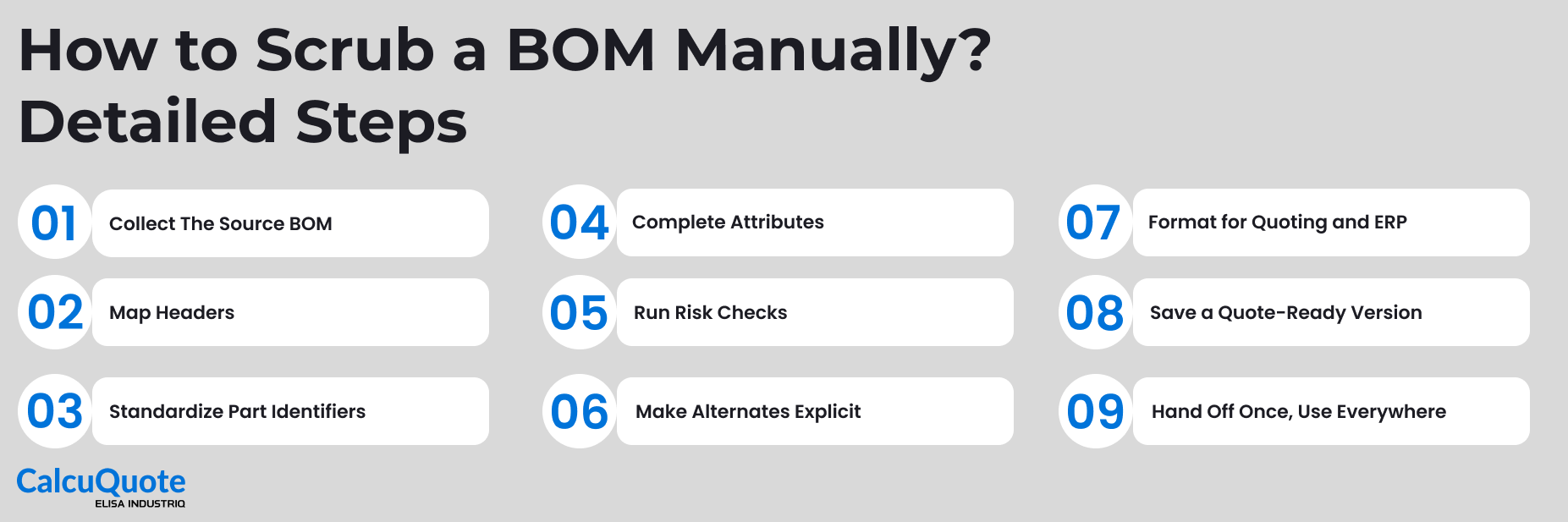
Most BOMs are not ready to quote the moment they arrive. Scrubbing helps you clean, complete, and structure them so they can move through quoting and purchasing without constant back-and-forth. Here is a practical flow most EMS teams can follow.
1. Collect The Source BOM
Start with whatever the customer sent: Excel, CSV, PDF, or a drawing export.
If it is a PDF from a large OEM, you might need to export it into Excel and then spend time unmerging header cells, fixing wrapped text, and deleting extra rows. Always confirm you have the latest revision and that part numbers, quantities, and reference designators appear somewhere in the file. Quoting from Rev A while the customer is already on Rev C creates instant confusion later.
2. Map Headers
Give each column a clear purpose so nothing important hides in the wrong place.
Typical columns include: customer part number, MPN, manufacturer, description, quantity per assembly, reference designators, package, and any internal codes. In real BOMs you might see a single column called “Notes” that secretly contains alternates, packaging requirements, and lifecycle comments. Pull those details into separate columns so buyers and engineers do not miss them.
3. Standardize Part Identifiers
Bring manufacturer names and part numbers into a consistent format so lookups and exports behave as expected.
You might see “Texas Instruments”, “TI”, and “Tex Instr” across different lines. Pick one version and use it everywhere. Part numbers often show up with extra spaces or punctuation, such as “SN74 HC 595 N” instead of “SN74HC595N”. Cleaning those differences by hand is dull work, but it prevents wasted time when sourcing teams cannot match a part in their systems.
4. Complete Attributes
Fill gaps that matter for sourcing, risk, and manufacturing.
For passives, check that value, tolerance, voltage, and package are filled. A line that just says “RES 10K” forces buyers to guess and increases the risk of the wrong reel turning up. For connectors, make sure pin count, orientation, and mounting type are captured. You can also use this step to add customer-specific requirements such as LED bin codes or coating notes that would otherwise live in email threads.
5. Run Risk Checks
Look beyond “does this part exist” and ask whether it is safe to base a build on it.
Check lifecycle status where you can. If you find a microcontroller that has been obsolete for years, mark that line for engineering review before the quote goes out. Look at stock and lead times from a few preferred suppliers. A part that appears active but shows very long lead times everywhere should be treated as high risk in the quote, not discovered after the order is won.
6. Make Alternates Explicit
Turn vague notes into something buyers and engineers can actually use.
Customers often write “ALT OK” or “or equivalent” in description fields. Translate that into a clear list of approved alternates or an internal rule about what can be swapped. For a resistor that can come from three manufacturers, list those as separate approved options instead of one merged text string. That way, alternates do not disappear when someone sorts or filters the sheet.
7. Format for Quoting and ERP
Shape the BOM so it can move through your systems without constant corrections.
Check that quantities are numeric, units of measure are consistent, and there are no hidden characters that will break imports. A surprising number of BOMs still include “5 pcs” in the quantity column. Align column names with what your quoting and ERP applications expect. For example, if your ERP uses “MFR_PART_NO” and your sheet says “MFG PN”, decide whether you will rename it now or map it during import.
8. Save a Quote-Ready Version
Lock in the cleaned-up version so everyone works from the same source.
Save a copy in your quoting folder or document control system with a clear naming convention, for example “CustomerName_Project_RevC_Scrubbed.xlsx”. Avoid personal desktop copies. When each estimator keeps their own variant, small differences creep in and it becomes unclear which one purchasing should be trusted.
9. Hand Off Once, Use Everywhere
Use that same scrubbed BOM through the rest of the process.
Feed it into your quoting application, send it to suppliers as the basis for RFQs, and use it for PO creation. If changes are needed later, update this master version rather than letting multiple edited copies appear in email threads. That simple habit cuts down on rework, conflicting data, and “which BOM did you use?” conversations.
What “Good” BOM Scrubbing Covers
Every quoting workflow starts with a BOM, but not every BOM is ready to quote. A good scrub doesn’t just clean up formatting but also validates the data and catches risk signals early. Here’s what an effective BOM scrub should cover:
- Consistent part mapping: Match MPNs, manufacturers, and alternates correctly across every line.
- Complete attributes: Fill in values, package types, reference designators, and other key fields.
- Early risk checks: Flag lifecycle issues, compliance gaps, or low availability before they slow things down.
- Clean alternates: Standardize internal notations and apply approved substitutes with clarity.
- Quote-ready formatting: Align UOM, quantities, and fields to work across sourcing and ERP systems.
How CalcuQuote Fixes BOM Scrubbing Pain at Scale
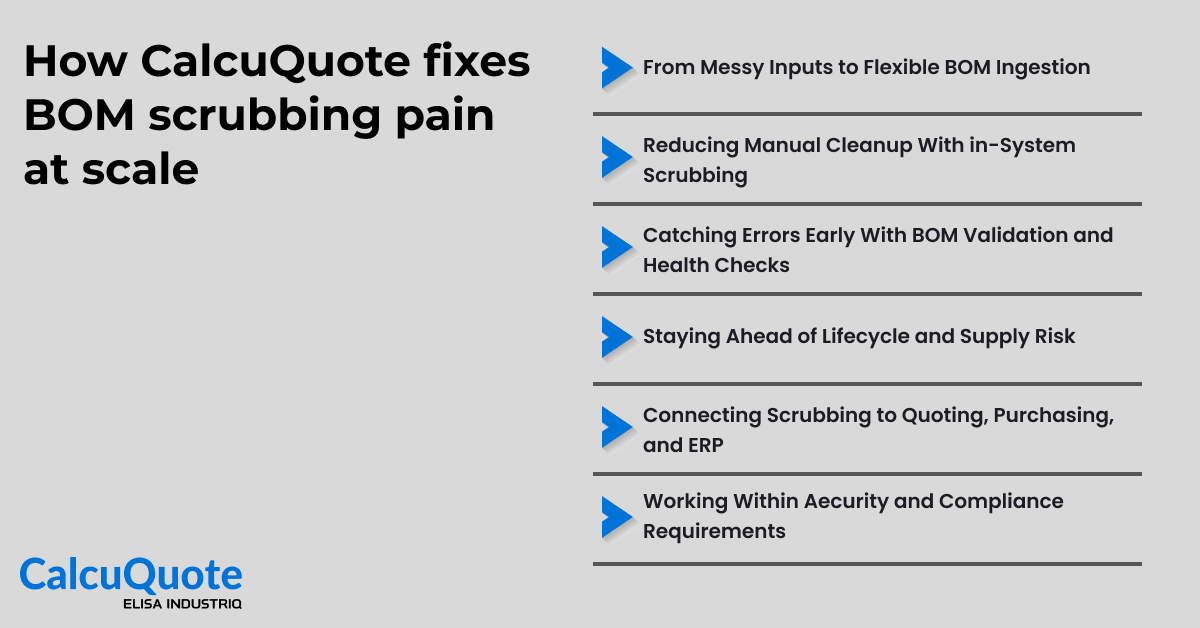
If the manual checklist above feels familiar and time-consuming, you are not alone. CalcuQuote follows the same logic but handles import, scrubbing, risk checks, and handoff in a single connected system instead of scattered spreadsheets.
From Messy Inputs to Flexible BOM Ingestion
CalcuQuote accepts Excel, CSV, and PDF inputs without forcing customers into a rigid template. Users can drag and drop whatever the customer provided and use intelligent column mapping to line up fields like description, quantity, manufacturer, and MPN.
Reducing Manual Cleanup With in-System Scrubbing
Instead of cleaning BOMs offline, teams can fix data inside CalcuQuote. Rules-based edits and history-driven logic help correct recurring issues such as quantity formats, naming quirks, and common abbreviations. Scrub My BOM can search for missing part details using descriptions or previous decisions. Bulk operations allow teams to fix entire groups of lines at once, not one at a time.
Catching Errors Early With BOM Validation and Health Checks
As soon as a BOM is imported, CalcuQuote runs checks that would otherwise require manual inspection. It flags quantity fields that contain letters, mismatches between quantity per assembly and reference designators, and incomplete or unknown part numbers. The BOM Health view goes further and evaluates lifecycle status, orderability, NCNR flags, and stock from franchise distributors.
Staying Ahead of Lifecycle and Supply Risk
For longer running programmes, BOM Health is not a one-time report. It can monitor BOMs over time and flag when a previously safe part becomes obsolete, moves into long lead time status, or drops below acceptable stock levels. Teams gain a clear view of single-sourced parts, fragile supply, and total landed cost, including tariffs and freight, rather than relying on static snapshots.
Connecting Scrubbing to Quoting, Purchasing, and ERP
Scrubbing in CalcuQuote connects directly into the rest of the flow. Once a BOM is clean and validated, the same file feeds quoting, supplier collaboration, purchasing, and ERP. Cross-matched parts and alternates do not get lost when buyers place orders. Purchasing functions such as auto-select and demand consolidation sit on top of the same clean BOM structure. Moreover, integrations with ERP and other systems let teams push costed BOMs, stock data, and part decisions into the wider stack.
Working Within Aecurity and Compliance Requirements
For customers with strict security needs, CalcuQuote can run in controlled environments that meet ITAR and related requirements. Bid activity, attached drawings, and line-level documents stay inside the system instead of being scattered across email threads. That allows sensitive programmes to benefit from shared BOM scrubbing and quoting logic without compromising data protection.
The CalcuQuote Fit Test for EMS Teams
CalcuQuote is built for fast-moving EMS teams handling high volumes, complex BOMs, and supplier variability. Here’s how to know if it fits your current quoting and sourcing workflow:
- BOM Quality: You deal with inconsistent formats, missing part data, or unclear alternates that slow down quoting.
- Sourcing Needs: You rely on supplier quotes, account-specific pricing, or volume price agreements across multiple vendors.
- Purchasing Flow: You need to convert approved BOMs into POs without remapping or retyping part details.
- System Setup: You use or plan to use ERP, PLM, or supply chain systems that require real-time integration and clean data handoffs.
- Team Collaboration: Your quoting or sourcing process involves multiple roles, task approvals, or customer/supplier touchpoints.
How CalcuQuote Compares on BOM Management
Most BOM tools stop at formatting and part lookup. CalcuQuote goes further by connecting BOM scrubbing directly to quoting, sourcing, and purchasing.
While platforms like Luminovo focus on dashboards and design-level insights, CalcuQuote is built specifically for EMS quoting teams. It brings in supplier-specific pricing, risk signals, internal part data, and customer workflows, then hands it off to purchasing in one connected flow.
CalcuQuote combines flexible BOM ingestion, automated scrubbing, BOM Health, alternate intelligence, and RFQ management in one place. You do not lose cross-matched parts or approved alternates when you move from quoting into purchasing.
See how CalcuQuote stacks up against Luminovo in our CalcuQuote vs Luminovo comparison.
Ready to Try BOM Scrubbing on Your Own Data?
If your current process looks like PDFs to Excel, unmerging cells, and hunting for MPN typos, , you’ve already seen the limits of doing this manually. It works for a handful of BOMs, but it does not scale, and it hides risk in the form of obsolete parts, long lead times, and inconsistent alternates.
CalcuQuote follows the same logical steps you would take in a careful manual scrub, but handles everything inside one connected system. Instead of rebuilding the same work for every new RFQ, you keep a single source of truth that links quoting, sourcing, and purchasing.
Request a demo, and we'll walk you through the platform using your quoting, sourcing, or purchasing challenges as the starting point.